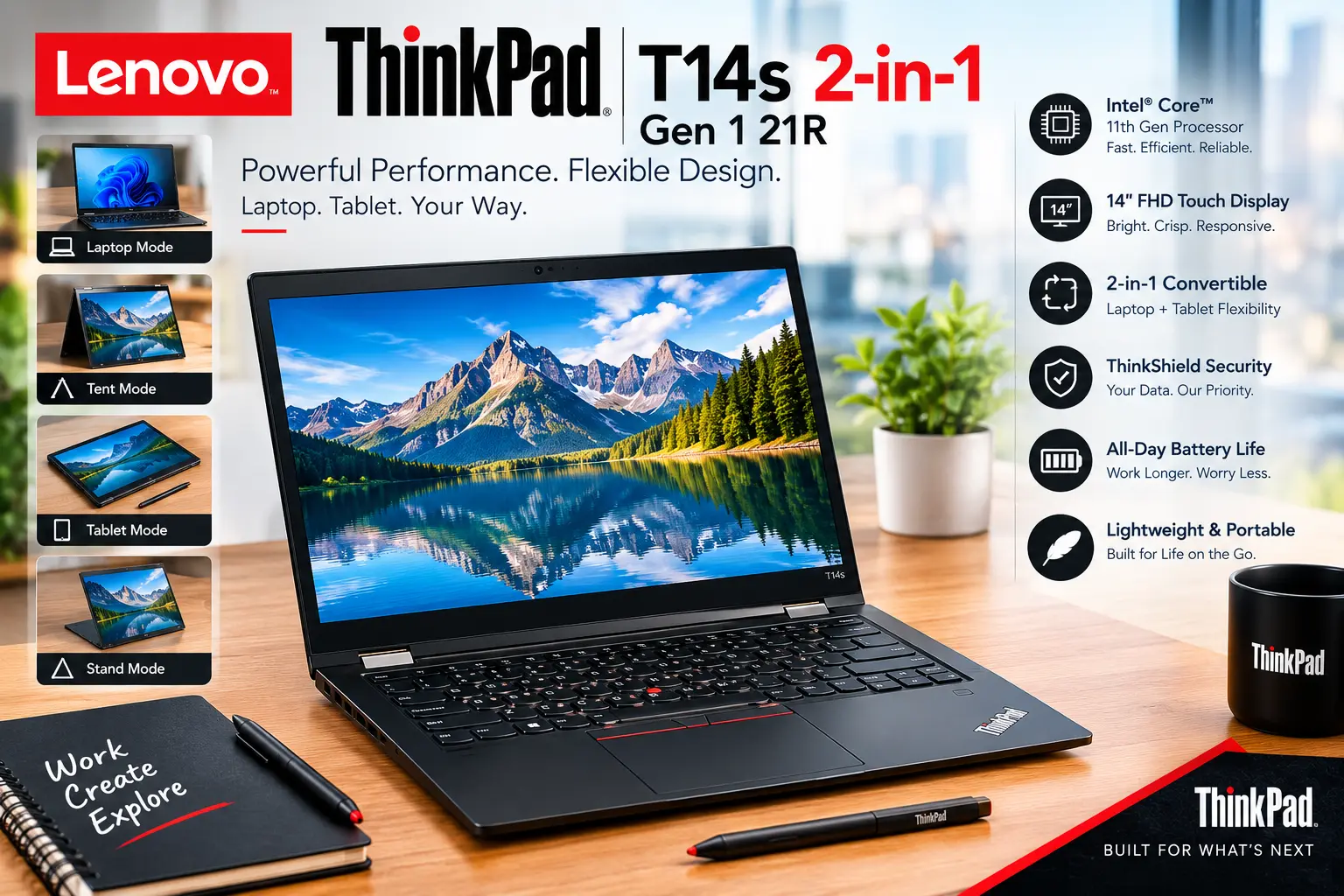
Lenovo ThinkPad T14s 2-in-1 Gen 1 21R: Complete Guide, Features and Specifications
The Lenovo ThinkPad T14s 2-in-1 Gen 1 21R is a business-focused convertible laptop designed for people who want the traditional productivity of a ThinkPad with the flexibility of a touchscreen 2-in-1 device. Lenovo lists the first-generation machine types as 21R3 and 21R4, so the “21R” part of the search term generally refers to this model family rather than one single configuration.
Unlike a standard ThinkPad T14s, this version is built around a flexible form factor that lets the display fold backward for different working modes. That makes it useful for office work, meetings, presentations, note-taking, and situations where a conventional laptop layout is not always the most convenient.
There is another important point about this model: specifications can vary significantly between individual configurations. Lenovo’s official PSREF documentation lists several processor, memory, storage, display, and connectivity options for the T14s 2-in-1 Gen 1. Because of that, buyers should check the exact model number before comparing prices or specifications.
What Is the Lenovo ThinkPad T14s 2-in-1 Gen 1 21R?
The Lenovo ThinkPad T14s 2-in-1 Gen 1 21R is a premium business convertible belonging to Lenovo’s ThinkPad T-series. The 21R designation is associated with the machine-type family, specifically 21R3 and 21R4. Lenovo’s support documentation also identifies the product as “T14s 2-in-1 Gen 1 (Type 21R3, 21R4).”
The main idea behind the machine is simple: combine a professional ThinkPad with a flexible touchscreen design. Instead of being limited to a traditional clamshell position, the display can be repositioned for different tasks. This makes the laptop more adaptable for presentations, reading, drawing, collaboration, and touch-based interaction.
The hardware is aimed primarily at professionals and business users, although students and home users can also benefit from the design. Depending on the configuration, the T14s 2-in-1 Gen 1 can be equipped with Intel Core Ultra processors, soldered LPDDR5X memory, fast PCIe SSD storage, Windows 11 Pro, and business-oriented security features. Lenovo’s PSREF lists both U-series Core Ultra 5/7 processors and H-series Core Ultra 7 options for this generation.
Design and 2-in-1 Flexibility
The biggest difference between the T14s 2-in-1 Gen 1 and a conventional ThinkPad T14s is the convertible design. The touchscreen can be folded backward, allowing the computer to function in multiple positions. For someone who regularly moves between desk work, presentations, and more casual viewing, this flexibility can be genuinely useful.
The 14-inch display provides a practical balance between portability and workspace. Lenovo’s configurations include WUXGA touchscreen panels with a 1920 × 1200 resolution, while some configurations offer features such as 500-nit brightness, 100% sRGB coverage, anti-glare treatment, and ThinkPad Privacy Guard. The exact display specification depends on the particular configuration.
The design also retains the professional appearance associated with ThinkPad computers. It is not built as a gaming machine or entertainment-first laptop. Instead, the emphasis is on productivity, portability, durability, security, and convenient everyday business use. Lenovo also states that the T14s 2-in-1 Gen 1 has passed MIL-STD-810H testing, although real-world durability will still depend on how the individual machine is handled.
Processor and Performance
One of the interesting aspects of the Lenovo ThinkPad T14s 2-in-1 Gen 1 21R family is the range of processors available. Lenovo’s specifications list Intel Core Ultra 5 225U and 235U processors alongside Core Ultra 7 options, with certain configurations using the more powerful Core Ultra 7 255U or H-series Core Ultra 7 265H.
For everyday business workloads, a Core Ultra 5 configuration can provide enough performance for web browsing, Microsoft Office applications, video meetings, document management, research, and multitasking. Users who regularly work with larger spreadsheets, heavier multitasking workloads, development tools, or demanding professional applications may prefer one of the higher-end Core Ultra 7 configurations.
The H-series configuration is particularly different because it can pair the Core Ultra 7 265H with integrated Intel Arc 140T graphics. Lenovo’s PSREF lists that configuration with 16 cores, 16 threads, a maximum turbo frequency of up to 5.3 GHz, and a 24 MB cache. It also includes an integrated Intel AI Boost NPU rated at up to 13 TOPS.
Memory and Storage Options
Memory is another area where configuration matters. Lenovo lists soldered LPDDR5X memory, meaning the RAM is integrated into the system board rather than installed in conventional upgradeable slots. Depending on the model, buyers can find configurations with 16GB or 32GB of memory, while Lenovo’s listed H-series configuration uses 32GB LPDDR5X-7467.
The lack of traditional RAM slots is worth considering before buying. If you expect to keep the laptop for many years and your workload may become more demanding, selecting sufficient memory at the time of purchase is important. A 16GB configuration can be perfectly reasonable for normal office use, while 32GB provides more headroom for heavier multitasking and professional workloads.
Storage is more flexible because Lenovo offers configurations with PCIe NVMe SSDs. The official PSREF lists a 1TB PCIe 5.0 x4 NVMe SSD in the Core Ultra 7 265H configuration, while other configurations can come with smaller or different-generation SSDs. Lenovo states that H-series models support one M.2 2280 PCIe 5.0 x4 storage slot, with support for up to a 2TB M.2 SSD in that configuration.
Display, Touchscreen and Pen Support
The touchscreen is one of the main reasons someone would choose this model instead of a standard business laptop. Lenovo lists a 14-inch WUXGA IPS touchscreen with 1920 × 1200 resolution in the configuration documented on its PSREF page. That 16:10 aspect ratio provides additional vertical workspace compared with traditional 16:9 laptop displays.
Some configurations offer 500-nit brightness, 100% sRGB coverage, anti-glare treatment, and ThinkPad Privacy Guard. Those features can be useful for office environments where the screen needs to remain readable under different lighting conditions. Privacy Guard can also be valuable when working with sensitive information in public spaces, although its availability depends on the specific display configuration.
Pen support adds another layer of flexibility. Lenovo lists the Lenovo Yoga Pen for the documented configuration, making the convertible design more useful for handwritten notes, annotations, diagrams, and presentations. The exact bundled accessories can vary, so buyers should confirm whether the pen is included with the particular model they are purchasing rather than assuming every T14s 2-in-1 package contains one.
Camera, Security and Business Features
Business users are likely to appreciate the security features built into the T14s 2-in-1 Gen 1. Depending on configuration, Lenovo lists features such as a fingerprint reader integrated into the power button, TPM 2.0, an IR camera for Windows Hello facial recognition, a camera privacy shutter, and other ThinkShield security technologies.
The camera setup can also be stronger than what is found on many ordinary laptops. Lenovo lists a 5MP camera with IR functionality in the documented configuration, along with computer-vision capabilities and a privacy shutter. For people who spend a large portion of their workday in video meetings, this is a useful part of the overall package.
Security is not limited to biometric features. ThinkPad systems are designed with business environments in mind, and Lenovo identifies ThinkShield as part of the platform’s broader security approach. Organizations can also select configurations with manageability features such as Intel vPro Enterprise, depending on the exact processor and model.
Battery Life and Connectivity
The ThinkPad T14s 2-in-1 Gen 1 uses a 58Wh battery in the configuration documented by Lenovo. It can also be paired with a 65W USB-C power adapter. Actual battery life will naturally depend on the processor, screen brightness, applications, wireless activity, power settings, and workload.
Connectivity options vary by configuration, but the platform is designed for modern professional use. Depending on the specific model, buyers can encounter USB-C/USB4 connectivity, USB-A ports, HDMI, wireless networking, and optional cellular connectivity. Some retail configurations are listed with LTE or 5G, so checking the exact model code is important if mobile broadband is a requirement.
For professionals who travel frequently, the combination of a convertible touchscreen, business security, modern wireless connectivity, and USB-C charging can make the laptop convenient to carry between home, office, meetings, and travel locations. The specific port selection should still be checked before purchasing, especially if you need a particular connector for an external monitor or docking setup.
Lenovo ThinkPad T14s 2-in-1 Gen 1 21R Specifications
| Specification | Details |
|---|---|
| Product | Lenovo ThinkPad T14s 2-in-1 Gen 1 21R |
| Machine Types | 21R3 / 21R4 |
| Display | 14-inch WUXGA touchscreen configurations |
| Resolution | Up to 1920 × 1200 in listed configurations |
| Processor Options | Intel Core Ultra 5 / Core Ultra 7 |
| Higher-End CPU | Core Ultra 7 265H on selected configuration |
| Graphics | Intel integrated graphics; Arc 140T on selected H-series configuration |
| Memory | 16GB / 32GB soldered LPDDR5X depending on model |
| Storage | PCIe NVMe SSD; capacity varies |
| Battery | 58Wh in documented configuration |
| Operating System | Windows 11 Pro on listed business configurations |
| Camera | Up to 5MP + IR on documented configuration |
| Security | TPM 2.0, fingerprint, IR/Windows Hello, privacy shutter depending on model |
| Pen | Lenovo Yoga Pen support |
| Form Factor | Convertible 2-in-1 |
| Machine Type Family | 21R3 / 21R4 |
Specifications can differ between individual model numbers. Lenovo specifically notes that product specifications may change and that actual configuration details can vary.
Google E-E-A-T Information
| E-E-A-T Factor | How This Article Addresses It |
|---|---|
| Experience | Explains practical use cases such as office work, presentations, touch interaction and mobile productivity. |
| Expertise | Breaks down the processor, display, memory, storage, security and convertible design in technical but readable language. |
| Authoritativeness | Core specifications are cross-checked against Lenovo’s official PSREF and support documentation. |
| Trustworthiness | Configuration differences are clearly identified instead of presenting one specification as universal across the entire 21R family. |
Who Should Consider the T14s 2-in-1 Gen 1?
The Lenovo ThinkPad T14s 2-in-1 Gen 1 21R makes the most sense for professionals who value flexibility as much as conventional laptop performance. Someone who spends the morning working with documents, moves into meetings during the day, and occasionally needs a tablet-style device can take advantage of the convertible design.
It can also be a practical choice for students and researchers who prefer a touchscreen for reading, annotation, handwritten notes, or presentations. The 14-inch form factor is large enough for serious productivity while remaining more portable than many larger business notebooks.
On the other hand, users who never use touchscreen functionality may have little reason to specifically seek out a 2-in-1 model. A conventional ThinkPad can provide a simpler form factor for users who mainly type at a desk. Likewise, people looking for a dedicated gaming machine should look elsewhere because this ThinkPad is fundamentally designed around professional productivity rather than gaming hardware.
What Makes the 21R Family Different?
The “21R” part of the keyword can cause confusion because it is not simply a single retail configuration. Lenovo’s official documentation identifies the T14s 2-in-1 Gen 1 with 21R3 and 21R4 machine types, while individual retail models have longer identifiers such as 21R30064AD or 21R3005WGE.
That distinction matters when searching for drivers, replacement parts, specifications, or accessories. Lenovo’s support pages specifically separate the T14s 2-in-1 Gen 1 into the 21R3/21R4 family, and its accessory documentation lists those machine types as compatible with several ThinkPad accessories.
Therefore, anyone searching for “Lenovo ThinkPad T14s 2-in-1 Gen 1 21R” should look beyond the shortened keyword and check the full model number. This can prevent mistakes when comparing processor, RAM, storage, display, cellular connectivity, warranty, and included accessories.
Lenovo ThinkPad T14s 2-in-1 Gen 1 21R: Final Thoughts
The Lenovo ThinkPad T14s 2-in-1 Gen 1 21R is a flexible business laptop that combines the familiar ThinkPad productivity approach with a convertible touchscreen design. Its strongest appeal comes from that combination: users get a professional notebook that can also adapt to touch-based work, presentations, reading, and pen input.
Performance is highly dependent on the selected configuration. The platform can range from Core Ultra 5 systems aimed at everyday productivity to higher-end Core Ultra 7 configurations, including an H-series model with Intel Arc 140T integrated graphics. Memory and storage also vary, so the full model number is more useful than simply searching for “21R.”
Overall, the T14s 2-in-1 Gen 1 is best understood as a business-oriented convertible rather than simply another touchscreen laptop. With features such as ThinkPad security options, modern Intel processors, a 14-inch touchscreen, optional pen support, fast SSD storage, and a 58Wh battery in the documented configuration, it provides a versatile platform for professional and productivity-focused users. Lenovo continues to provide dedicated drivers, firmware, documentation, and support resources for the 21R3/21R4 family, which is also useful when maintaining the machine over time.